
User Manual

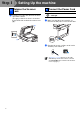
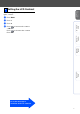
Table Of Contents
- Quick Setup Guide DCP-8060
- Table of Contents
- Getting Started
- Step1 Setting Up the machine
- Step2 Installing the Drivers & Software
- Options and Consumables
- Brother ENG

6
1 Push the lever (1) in the direction shown to
unlock the scanner.
(The gray scanner lock lever is located at
the back left side, under the document cover
(2).)
Do not connect the Parallel or USB
cable yet.
1 Make sure that the power switch is off.
Connect the AC power cord to the machine.
2 Plug the AC power cord into an AC outlet.
Turn the power switch on.
3
Release the Scanner
Lock
(2)
(1)
4 Connect the Power Cord
If Scanner Locked appears on the LCD,
immediately release the scanner lock and
press Stop/Exit. (See “Release the Scanner
Lock” on page 6.)
Step 1
Setting Up the machine