
User Manual

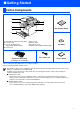
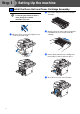
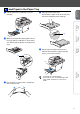
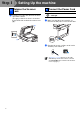
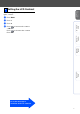
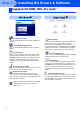
Table Of Contents
- Quick Setup Guide DCP-8060
- Table of Contents
- Getting Started
- Step1 Setting Up the machine
- Step2 Installing the Drivers & Software
- Options and Consumables
- Brother ENG

3
Table of Contents
Setting Up the machine
1. Install the Drum Unit and Toner Cartridge Assembly ................................... 4
2. Load Paper in the Paper Tray .......................................................................... 5
3. Release the Scanner Lock ............................................................................... 6
4. Connect the Power Cord .................................................................................. 6
5. Setting the LCD Contrast ................................................................................. 7
Installing the Drivers & Software
Supplied CD-ROM “MFL-Pro Suite” ................................................................................ 8
For USB Interface Cable Users
(For Windows
®
98/98SE/Me/2000 Professional/XP/XP Professional x64 Edition) .... 10
For Parallel Interface Cable Users
(For Windows
®
98/98SE/Me/2000 Professional/XP/XP Professional x64 Edition) .... 12
For Windows NT
®
Workstation Version 4.0 Users ...................................................... 15
For USB Interface Cable Users
■ For Mac OS
®
X 10.2.4 or greater ...................................................................... 17
■ Options and Consumables
Options ............................................................................................................................ 20
Replacement Consumables ........................................................................................... 20
Step 1
Step 2