
User Manual
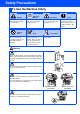
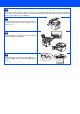
Table Of Contents
- Quick Setup Guide DCP-8060/DCP-8065DN
- Safety Precautions
- Getting Started
- Table of Contents
- Step1 Setting Up the machine
- Step2 Installing the Drivers & Software
- Supplied CD-ROM “MFL-Pro Suite”
- For USB Interface Cable Users (For Windows® 98/98SE/Me/2000 Professional/XP/XP Professional x64 Edition)
- For Parallel Interface Cable Users (For Windows® 98/98SE/Me/2000 Professional/XP/XP Professional x64 Edition)
- For Windows NT® Workstation Version 4.0 Users
- For Network Interface Cable Users (DCP-8065DN only) (For Windows® 98/98SE/Me/NT/2000 Professional/XP/XP Professional x64 Edition)
- For USB Interface Cable Users
- For Network Interface Cable Users (DCP-8065DN only)
- For Network Users and Administrators (DCP-8065DN only)
- Options and Consumables
- brother UK/IRE/SAF

Do not use a vacuum cleaner to clean up scattered toner. Doing this might cause the toner dust to ignite inside
the vacuum cleaner, potentially starting a fire. Please carefully clean the toner dust with a dry, lint-free cloth and
dispose of it according to local regulations.
To prevent injuries, be careful not to put your hands on
the edge of the machine under the document cover or
scanner cover.
To prevent injuries, be careful not to put your fingers in
the area shaded in the illustration.
When you move the machine, use the handholds
provided. Do NOT carry the machine by holding it at the
bottom.