
User Manual
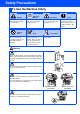
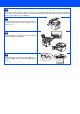
Table Of Contents
- Quick Setup Guide DCP-8060/DCP-8065DN
- Safety Precautions
- Getting Started
- Table of Contents
- Step1 Setting Up the machine
- Step2 Installing the Drivers & Software
- Supplied CD-ROM “MFL-Pro Suite”
- For USB Interface Cable Users (For Windows® 98/98SE/Me/2000 Professional/XP/XP Professional x64 Edition)
- For Parallel Interface Cable Users (For Windows® 98/98SE/Me/2000 Professional/XP/XP Professional x64 Edition)
- For Windows NT® Workstation Version 4.0 Users
- For Network Interface Cable Users (DCP-8065DN only) (For Windows® 98/98SE/Me/NT/2000 Professional/XP/XP Professional x64 Edition)
- For USB Interface Cable Users
- For Network Interface Cable Users (DCP-8065DN only)
- For Network Users and Administrators (DCP-8065DN only)
- Options and Consumables
- brother UK/IRE/SAF

Warning
To Use the Machine Safely
Warning
Electrical
Hazard
Hot Surface Caution
Warnings tell you what to
do to prevent possible
personal injury.
Electrical Hazard icons
alert you to a possible
electrical shock.
Hot Surface icons warn
you not to touch machine
parts that are hot.
Cautions specify
procedures you must
follow or avoid to prevent
possible damage to the
machine.
Improper
Setup
Note User’s Guide
Improper Setup icons alert
you to devices and
operations that are not
compatible with the
machine.
Notes tell you how you
should respond to a
situation that may arise or
give tips about how the
current operation works
with other features.
Indicates reference to the
User’s Guide.
There are high voltage electrodes inside the machine.
Before you clean the inside of the machine, make sure
you have unplugged the power cord from the electrical
socket.
Do not handle the plug with wet hands. Doing this might
cause an electrical shock.
After you use the machine, some internal parts are
extremely HOT!
To prevent injuries, be careful not to put your fingers in
the areas shown in the illustration.
The fuser unit is marked with a caution label. Please do
not remove or damage the label.
Inside the machine
(Front View)
Open the back cover
(Back View)
Safety Precautions