
User Manual
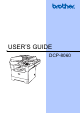


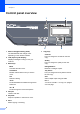
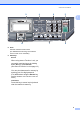
Table Of Contents
- Table of Contents DCP-8060
- Compilation and Publication Notice
- Table of Contents
- Section I General
- Section II Copy
- Section III Software
- Section IV Appendices
- Brother ENG

Chapter 1
4
Control panel overview 1
1 Status LED (light emitting diode)
The LED will flash and change colour
depending on the machine’s status.
2 LCD (liquid crystal display)
Displays messages to help you use your
machine.
3 Menu keys:
Menu
Accesses the main menu.
Clear/Back
Deletes entered data or lets you exit the
menu.
OK
Selects a setting.
d or c
Scrolls backwards or forwards through menu
selections.
a or b
Scrolls through the menus and options.
4Dialpad
Used to enter text.
5 Stop/Exit
Stops an operation or exits from a menu.
6Start
Starts copying or scanning.
7Copy keys
Contrast
Lets you change the contrast for the next
copy.
Quality
Lets you change the quality for the next
copy.
Enlarge/Reduce
Reduces or enlarges copies.
Tray Select
Lets you change which tray will be used for
the next copy.
Sort
Sorts multiple copies using the ADF.
N in 1
You can choose N in 1 to copy 2 or 4 pages
onto one page.
89
2
1