
User Manual
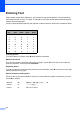


Table Of Contents
- Table of Contents DCP-8060
- Compilation and Publication Notice
- Table of Contents
- Section I General
- Section II Copy
- Section III Software
- Section IV Appendices
- Brother ENG

76
Entering Text D
When setting certain menu selections, you will need to type text characters. The dial pad keys
have letters printed on keys. The keys: 0, # and l do not have printed letters because they are
used for special characters.
Press the appropriate dial pad key the required number of times to access the characters below:
Inserting spaces
To enter a space in a name, press c twice between characters.
Making corrections
If you entered a letter incorrectly and want to change it, press d to move the cursor under the
incorrect character, and then press Clear/Back.
Repeating letters
To enter a character on the same key as the previous character, press c to move the cursor right
before pressing the key again.
Special characters and symbols
Press l, # or 0, then press d or c to move the cursor under the symbol or character you want.
Press OK to select it.
Press
Key
one
time
two
times
three
times
four
times
2 ABC2
3 DEF3
4 GH I 4
5 JKL5
6 MNO6
7 PQRS
8 TUV8
9 WX Y Z
Press l for (space) ! " # $ % & ' ( ) l + , - . / m
Press # for : ; < = > ? @ [ ] ^ _
Press 0 for Ä Ë Ö Ü À Ç È É 0