
User Manual
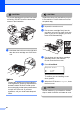
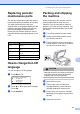
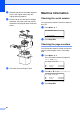
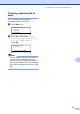


Table Of Contents
- Table of Contents DCP-8060
- Compilation and Publication Notice
- Table of Contents
- Section I General
- Section II Copy
- Section III Software
- Section IV Appendices
- Brother ENG

Troubleshooting and routine maintenance
67
C
Replacing periodic
maintenance parts C
The periodic maintenance parts will need to
be replaced regulary to maintain print quality.
The parts listed below will have to be
replaced after printing approximately 25,000
pages for the paper feeding kit for MP tray
and 100,000 pages for the other parts.
Please call your Brother dealer for service
when the following messages appear on the
LCD.
How to change the LCD
language
C
You can change the LCD language.
a Press Menu, 1, 0.
10.Local Language
a English
Français
b Deutsch
Select ab & OK
b Press a or b to select your language.
Press OK.
c Press Stop/Exit.
Packing and shipping
the machine C
When you transport the machine, use the
packing materials that came with your
machine. If you do not pack the machine
properly, you could void your warranty. The
machine should be adequately insured with
the carrier.
a Turn off the machine’s power switch.
b Unplug all the cables and AC power
cord from the machine.
c Push the Scanner Lock Lever down to
lock the scanner. This lever is located on
the left of the scanner glass.
CAUTION
Damage caused to your machine by failure
to lock the scanner before packing and
shipping may void your warranty.
d Open the front cover.
e Take out the drum unit and toner
cartridge assembly. Leave the toner
cartridge installed in the drum unit.
f Put the drum unit and toner cartridge
assembly into the plastic bag and seal
the bag.
g Close the front cover.
LCD message Description
Replace PF
KitMP
Replace paper feeding kit for
MP tray.
Replace PF
Kit1
Replace paper feeding kit for
Tray 1.
Replace PF
Kit2
Replace paper feeding kit for
Tray 2.
Replace Fuser Replace fuser unit.
Replace Laser Replace laser unit.