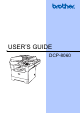
User Manual
Manuals
Brands
Brother Manuals
All in One Printer
DCP 8060
1
2
3
4
5
6
7
8
9
10
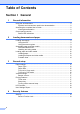
Table Of Contents
Table of Contents DCP-8060
Compilation and Publication Notice
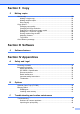
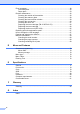
Table of Contents
Section I General
1 General information
Using the documentation
Symbols and conventions used in the documentation
Accessing the complete User’s Guide
Viewing documentation
Viewing documentation (Windows®)
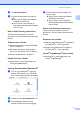
How to find Scanning instructions
Software User's Guide:
PaperPort® User's Guide
Viewing Documentation (Macintosh®)
How to find Scanning instructions
Software User's Guide:
Presto!® PageManager® User's Guide
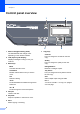
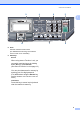
Control panel overview
Status LED indications
2 Loading documents and paper
Loading documents
Using the ADF
Using the scanner glass
Acceptable paper and other media
Recommended media
Handling and using media
Paper capacity of the paper tray
Loading paper and other media
Loading paper
Loading envelopes and other media
Loading Envelopes
Printable Area
Printable Area when printing from a computer
3 General setup
Paper settings
Paper Type
Paper Size
Tray use in Copy mode
Tray use in Print mode
Volume Settings
Beeper volume
Ecology features
Toner save
Sleep time
Turning off the scanner lamp
LCD Contrast
User Settings Report
4 Security features
Security
Secure Function Lock
Setting the password for the administrator
Setting up the Public user
Setting up restricted users
Turning Secure Function Lock on/off
Turning Secure Function Lock on
Turning Secure Function Lock off
Switching Users
Section II Copy
5 Making copies
How to copy
Making a single copy
Making multiple copies
Stop copying
Copy options
Changing copy quality
Changing text copy resolution
Enlarging or reducing the image copied
Making N in 1 copies or a poster
Important
If you are copying from the ADF:
If you are copying from the scanner glass:
Sorting copies using the ADF
Adjusting contrast
Contrast
Tray Select
Out of Memory message
Section III Software
6 Software features
Section IV Appendices
A Safety and Legal
Choosing a location
Important Information
Safety precautions
IEC 60825-1 Specification
Laser Diode
Disconnect device
Radio interference
Important safety instructions
Trademarks
B Options
Optional Paper Tray (LT-5300)
Memory Board
DIMM types
Installing extra memory
C Troubleshooting and routine maintenance
Troubleshooting
Solutions to common problems
Copy Quality Difficulties
Printing Difficulties (Continued)
Scanning Difficulties
Software Difficulties
Paper Handling Difficulties
Print Quality Difficulties
Improving the print quality
Error messages
Document jams
Document is jammed in the top of the ADF unit
Document is jammed inside the ADF unit
Document is jammed at the output tray
Paper jams
Paper is jammed inside the machine
Paper is jammed at the back of the machine
Paper is jammed inside the drum unit and toner cartridge assembly
Routine maintenance
Cleaning the outside of the machine
Clean the outside of the machine as follows:
Cleaning the scanner glass
Cleaning the laser scanner window
Cleaning the corona wire
Cleaning the drum unit
Replacing the toner cartridge (TN-3135/TN-3175)
Replacing the toner cartridge
Replacing the drum unit (DR-3150)
Replacing periodic maintenance parts
How to change the LCD language
Packing and shipping the machine
Machine Information
Checking the serial number
Checking the page counters
Checking remaining life of parts
D Menu and Features
On-screen programming
Menu table
Memory storage
Menu keys
Menu Table
Entering Text
E Specifications
General
Print media
Copy
Scan
Print
Interfaces
Computer requirements
Consumable items
F Glossary
G Index
Brother ENG
Section I
General
I
General information
2
Loading docume
nts and paper
8
General setup
15
Security features
19
1
...
...
4
5
6
7
8
...
...
90