
User Manual

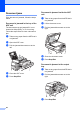


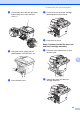
Table Of Contents
- Table of Contents DCP-8060
- Compilation and Publication Notice
- Table of Contents
- Section I General
- Section II Copy
- Section III Software
- Section IV Appendices
- Brother ENG

Troubleshooting and routine maintenance
53
C
Paper jams C
To clear paper jams, please follow the steps
in this section.
HOT SURFACE
After you have just used the machine, some
internal parts of the machine will be
extremely hot. When you open the front or
back cover of the machine, DO NOT touch
the shaded parts shown in the illustration.
Paper is jammed inside the machine C
a Pull the paper tray completely out of the
machine.
b Use both hands to slowly pull out the
jammed paper.
c Press the cover release lever to open
the front cover.
d Slowly take out the drum unit and toner
cartridge assembly. The jammed paper
may be pulled out with the toner
cartridge and drum unit assembly, or
this may release the paper so you can
pull it out of the paper tray opening.