
User Manual
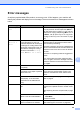

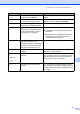
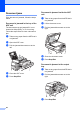


Table Of Contents
- Table of Contents DCP-8060
- Compilation and Publication Notice
- Table of Contents
- Section I General
- Section II Copy
- Section III Software
- Section IV Appendices
- Brother ENG

Troubleshooting and routine maintenance
49
C
Error messages C
As with any sophisticated office product, errors may occur. If this happens, your machine will
identify the problem and display an error message. The most common error messages are shown
below.
Error Message Cause Action
Check Paper
Size
Paper is not the correct size. Load the correct size of paper (A4, Letter, Legal
or Folio) and then set the Paper Size (Menu, 1,
2). (See Paper Size on page 15.) Then, set the
Tray Use for copying and printing (Menu, 1, 5, 1
or Menu, 1, 5, 2). (See Tray use in Copy mode
on page 16 and Tray use in Print mode on page
16.)
Cooling Down
Wait for a
while
The temperature of the drum unit or
toner cartridge is too hot. The
machine will pause its current print
job and go into cooling down mode.
During the cooling down mode, you
will hear the cooling fan running
while the LCD shows Cooling
Down, and Wait for a while.
Make sure that you can hear the fan in the
machine spinning and that the exhaust outlet
isn't blocked by something.
If the fan is spinning, remove any obstacles that
surround the exhaust outlet, and then leave the
machine turned on but do not use it for several
minutes.
If the fan is not spinning follow the suggestions
below.
Turn off the machine's power switch and then
turn it on again. If the error message continues
leave the machine for several minutes and then
try it again.
Cover is Open The front cover is not closed
completely.
Close the front cover of the machine.
The fuser cover is not closed
completely or the paper is jammed
at the fuser unit.
Open the back cover, and then open the fuser
cover. Remove jammed paper if there is any,
and then close the fuser cover and the back
cover.
Document Jam The document was not inserted or
fed properly, or the document
scanned from the ADF was too
long.
See Document jams on page 52 or Using the
ADF on page 8.
Drum Near End The drum unit is near the end of its
life.
Use the drum unit until you have a print quality
problem; then replace the drum unit with a new
one.
See Replacing the drum unit (DR-3150) on page
65.
The drum counter was not reset
when a new drum was installed.
1. Open the front cover, and then press
Clear/Back.
2. Press 1 to reset.
Dust On Drum The primary corona wire on the
drum unit needs to be cleaned.
Clean the primary corona wire on the drum unit.
(See Cleaning the corona wire on page 60.)