
User Manual
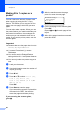
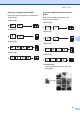


Table Of Contents
- Table of Contents DCP-8060
- Compilation and Publication Notice
- Table of Contents
- Section I General
- Section II Copy
- Section III Software
- Section IV Appendices
- Brother ENG

Making copies
29
5
Tray Select 5
You can change the tray use only for the next
copy.
a Load your document.
b Use the dial pad to enter the number of
copies (up to 99).
c Press Tray Select.
Contrast:-nnonn+
Quality :Auto
Enlg/Red:100%
Tray :MP>T1
c
Select d c & OK
d Press d or c to select the tray usage.
Press OK.
e Press Start.
* XXX is the paper size you set in Menu, 1, 2.
Note
• T2 and #2 appear only if the optional
paper tray is installed.
• To change the Tray Select setting, see
Tray use in Copy mode on page 16.
Out of Memory
message 5
If the memory becomes full while you are
making copies, the LCD message will guide
you through the next step.
If you get an Out of Memory message while
scanning a subsequent page, you will have
the option to press Start to copy the pages
scanned so far, or to press Stop/Exit to
cancel the operation.
If you run out of memory, you can add it. See
Memory Board on page 40.
Press Tray Select MP>TI or M>T1>T2
T1>MP or T1>T2>M
#1 (XXX)*
#2 (XXX)*
MP (XXX)*