
User Manual
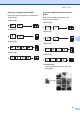


Table Of Contents
- Table of Contents DCP-8060
- Compilation and Publication Notice
- Table of Contents
- Section I General
- Section II Copy
- Section III Software
- Section IV Appendices
- Brother ENG

Making copies
27
5
If you are copying from the ADF: 5
Insert your document face up in the direction
shown below:
2 in 1 (P)
2 in 1 (L)
4 in 1 (P)
4 in 1 (L)
If you are copying from the scanner
glass:
5
Insert your document face down in the
direction shown below:
2 in 1 (P)
2 in 1 (L)
4 in 1 (P)
4 in 1 (L)
Poster (3x3)
You can make a poster size copy of a
photograph.