
User Manual

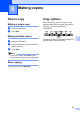
Table Of Contents
- Table of Contents DCP-8060
- Compilation and Publication Notice
- Table of Contents
- Section I General
- Section II Copy
- Section III Software
- Section IV Appendices
- Brother ENG

23
5
5
How to copy 5
Making a single copy 5
a Load your document.
b Press Start.
Making multiple copies 5
a Load your document.
b Use the dial pad to enter the number of
copies (up to 99).
c Press Start.
Note
To sort your copies, press Sort. (See
Sorting copies using the ADF on page 28).
Stop copying 5
To stop copying, press Stop/Exit.
Copy options 5
When you want to quickly change the copy
settings temporarily for the next copy, use the
Copy keys. You can use different
combinations.
The machine returns to its default settings 60
seconds after it finishes copying.
Making copies 5