
User Manual

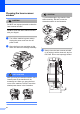
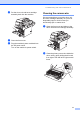
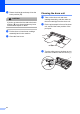

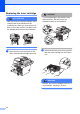
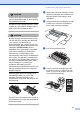


Table Of Contents
- USER’S GUIDE DCP-8060/DCP-8065DN
- Brother numbers
- Ordering accessories and supplies
- Compilation and Publication Notice
- Table of Contents
- Section I: General
- Section II: Copy
- Section III: Software
- Section IV:Appendixes
- A Safety and Legal
- B Options
- C Troubleshooting and routine maintenance
- D Menu and Features
- E Specifications E
- F Glossary
- Index
- brother USA/CAN

72
c Return the blue tab and snap it into the
home position (b).
CAUTION
If you do not return the blue tab to the home
position (b) your printed pages may have
vertical black stripes on them.
d Put the drum unit and toner cartridge
assembly back in the machine.
e Close the front cover.
Cleaning the drum unit C
a Take out the drum unit and toner
cartridge assembly, and then take out
the toner cartridge from the drum unit.
b Put the print sample in front of the drum
unit, and find the exact position of the
poor print.
c Turn the white gear on the drum as you
check the surface of the OPC drum (1).
1