
User Manual

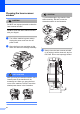
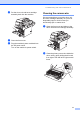
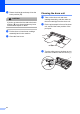

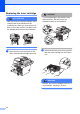
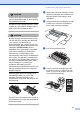


Table Of Contents
- USER’S GUIDE DCP-8060/DCP-8065DN
- Brother numbers
- Ordering accessories and supplies
- Compilation and Publication Notice
- Table of Contents
- Section I: General
- Section II: Copy
- Section III: Software
- Section IV:Appendixes
- A Safety and Legal
- B Options
- C Troubleshooting and routine maintenance
- D Menu and Features
- E Specifications E
- F Glossary
- Index
- brother USA/CAN

Troubleshooting and routine maintenance
71
d Put the drum unit and toner cartridge
assembly back into the machine.
e Close the front cover.
f Plug the machine’s power cord back into
the AC power outlet.
Turn on the machine’s power switch.
Cleaning the corona wire C
We recommend that you put the drum unit
and toner cartridge assembly on a piece of
disposable paper or cloth in case you
accidentally spill or scatter toner.
a Open the front cover and take out the
drum unit and toner cartridge assembly.
b Clean the primary corona wire inside the
drum unit by gently sliding the blue tab
from right to left and left to right several
times.
1