
User Manual
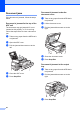
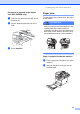

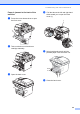
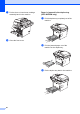
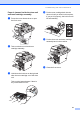
Table Of Contents
- USER’S GUIDE DCP-8060/DCP-8065DN
- Brother numbers
- Ordering accessories and supplies
- Compilation and Publication Notice
- Table of Contents
- Section I: General
- Section II: Copy
- Section III: Software
- Section IV:Appendixes
- A Safety and Legal
- B Options
- C Troubleshooting and routine maintenance
- D Menu and Features
- E Specifications E
- F Glossary
- Index
- brother USA/CAN

Troubleshooting and routine maintenance
67
Paper is jammed inside the drum unit
and toner cartridge assembly C
a Press the cover release lever to open
the front cover.
b Take out the drum unit and toner
cartridge assembly.
c Hold down the lock lever on the right and
take the toner cartridge out of the drum
unit.
Take out the jammed paper if there is
any inside the drum unit.
d Put the toner cartridge back into the
drum unit until you hear it lock into place.
If you put it in properly, the lock lever will
lift automatically.
e Put the drum unit and toner cartridge
assembly back in the machine.
f Close the front cover.