
User Manual
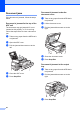
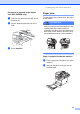

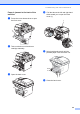
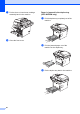
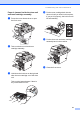
Table Of Contents
- USER’S GUIDE DCP-8060/DCP-8065DN
- Brother numbers
- Ordering accessories and supplies
- Compilation and Publication Notice
- Table of Contents
- Section I: General
- Section II: Copy
- Section III: Software
- Section IV:Appendixes
- A Safety and Legal
- B Options
- C Troubleshooting and routine maintenance
- D Menu and Features
- E Specifications E
- F Glossary
- Index
- brother USA/CAN

Troubleshooting and routine maintenance
65
Paper is jammed at the back of the
machine C
a Press the cover release lever to open
the front cover.
b Take out the drum unit and toner
cartridge assembly.
c Open the back cover.
d Pull the tabs at the left and right hand
sides toward you to open the fuser
cover (1).
e Using both hands, gently pull the
jammed paper out of the fuser unit.
f Close the back cover.
1