
User Manual
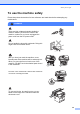


Table Of Contents
- USER’S GUIDE DCP-8060/DCP-8065DN
- Brother numbers
- Ordering accessories and supplies
- Compilation and Publication Notice
- Table of Contents
- Section I: General
- Section II: Copy
- Section III: Software
- Section IV:Appendixes
- A Safety and Legal
- B Options
- C Troubleshooting and routine maintenance
- D Menu and Features
- E Specifications E
- F Glossary
- Index
- brother USA/CAN

40
To prevent injuries, be careful not to put your
fingers in the area shown in the illustrations.
DO NOT use a vacuum cleaner to clean up scattered toner. Doing this might cause the toner
dust to ignite inside the vacuum cleaner, potentially starting a fire. Please carefully clean the
toner dust with a dry, lint-free cloth and dispose of it according to local regulations.
When you move the machine, grasp the side hand
holds that are under the scanner. DO NOT carry
the machine by holding it at the bottom.
This product must be installed near an AC power outlet that is easily accessible. In case of
an emergency, you must disconnect the power cord from the AC power outlet to shut off the
power completely.
To reduce the risk of shock or fire, use only a No. 26 AWG or larger telecommunication line cord.