
User Manual
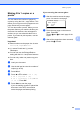
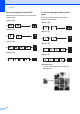


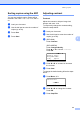
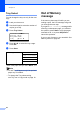


Table Of Contents
- USER’S GUIDE DCP-8060/DCP-8065DN
- Brother numbers
- Ordering accessories and supplies
- Compilation and Publication Notice
- Table of Contents
- Section I: General
- Section II: Copy
- Section III: Software
- Section IV:Appendixes
- A Safety and Legal
- B Options
- C Troubleshooting and routine maintenance
- D Menu and Features
- E Specifications E
- F Glossary
- Index
- brother USA/CAN

Making copies
33
5
Sorting copies using the ADF5
You can sort multiple copies. Pages will be
stacked in the order 1 2 3, 1 2 3, 1 2 3, and so
on.
a Load your document.
b Use the dial pad to enter the number of
copies (up to 99).
c Press Sort.
d Press Start.
Adjusting contrast 5
Contrast 5
Adjust the contrast to help an image look
sharper and more vivid.
To temporarily change the contrast setting,
follow the steps below:
a Load your document.
b Use the dial pad to enter the number of
copies (up to 99).
c (DCP-8060)
Press Contrast.
(DCP-8065DN)
Press Contrast/Quality.
Press a or b to choose Contrast.
Press OK.
Contrast:-nnonn+ c
Quality :Auto
Enlg/Red:100%
Tray :MP>T1
Select d c & OK
d Press d or c to increase or decrease
the contrast.
e Press Start.
To change the default setting follow the steps
below:
a Press Menu, 2, 3.
23.Contrast
-
nnonn+
Select d c & OK
b Press d or c to change the contrast.
Press OK.
c Press Stop/Exit.