
User Manual

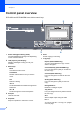


Table Of Contents
- USER’S GUIDE DCP-8060/DCP-8065DN
- Brother numbers
- Ordering accessories and supplies
- Compilation and Publication Notice
- Table of Contents
- Section I: General
- Section II: Copy
- Section III: Software
- Section IV:Appendixes
- A Safety and Legal
- B Options
- C Troubleshooting and routine maintenance
- D Menu and Features
- E Specifications E
- F Glossary
- Index
- brother USA/CAN

General information
7
1
8 Scan
Puts the machine in Scan mode.
(For details about scanning, see Software
User’s Guide on the CD-ROM.)
9 Print keys
Secure
Prints data saved in memory when you enter
your four-digit password.
(For details about using the Secure key, see
the Software User’s Guide on the CD-ROM.)
Job Cancel
Press this key to cancel a print job and clear
the machine’s memory.
2
3
4
5
8 76