
User Manual
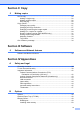
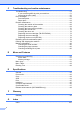

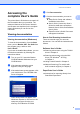


Table Of Contents
- USER’S GUIDE DCP-8060/DCP-8065DN
- Brother numbers
- Ordering accessories and supplies
- Compilation and Publication Notice
- Table of Contents
- Section I: General
- Section II: Copy
- Section III: Software
- Section IV:Appendixes
- A Safety and Legal
- B Options
- C Troubleshooting and routine maintenance
- D Menu and Features
- E Specifications E
- F Glossary
- Index
- brother USA/CAN

General information
5
1
Accessing Brother
Support
(For Windows
®
) 1
You can find all the contacts you will need,
such as Web support (Brother Solutions
Center), Customer Service and Brother
Authorized Service Centers on page i and on
the Brother CD-ROM.
Click Brother Support on the main menu.
The following screen will appear:
To access our web site
(www.brother.com
) click
Brother Home Page.
To view all Brother Numbers, including
Customer Service numbers for the USA
and Canada, click Support Information.
To access the USA Brother online
shopping mall (www.brothermall.com
) for
additional product and service
information, click Brother Mall.com.
For the latest news and product support
information
(http://solutions.brother.com/
), click
Brother Solutions Center.
To return to the main page, click Back.
Or, if you have finished, click Exit.