
User Manual

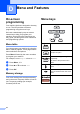
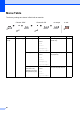


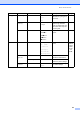
Table Of Contents
- USER’S GUIDE DCP-8060/DCP-8065DN
- Compilation and Publication Notice
- EC Declaration of Conformity
- Table of Contents
- Section I: General
- Section II: Copy
- Section III: Software
- Section IV: Appendices
- A Safety and Legal
- B Options
- C Troubleshooting and routine maintenance
- D Menu and Features
- E Specifications
- F Glossary
- Index
- brother UK/IRE/SAF

Menu and Features
83
2.Copy 1.Quality — Auto*
Photo
Text
You can choose the Copy
resolution for your type of
document.
25
2.FB Txt
Quality
— 12000×600dpi
600dpi*
You can change to the
higher Copy resolution
when you make a text copy
with 100% ratio using the
scanner glass.
25
3.Contrast — -nnnno+
-nnnon+
-nnonn+*
-nonnn+
-onnnn+
Adjusts the contrast for
copies.
31
3.Printer 1.Emulation — Auto (EPSON)*
Auto (IBM)
HP LaserJet
BR-Script 3
Epson FX-850
IBM Proprinter
Chooses the emulation
mode.
See
Software
User’s
Guide
on the
CD-
ROM.
2.Print
Options
1.Internal Font — Prints a list of the
machine’s internal fonts.
2.Configuration — Prints a list of the
machine’s printer settings.
3.Reset
Printer
— 1.Reset
2.Exit
Returns the PCL setting to
the default settings.
Main Menu Submenu Menu Selections Options Descriptions Page