
User Manual



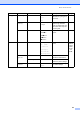
Table Of Contents
- USER’S GUIDE DCP-8060/DCP-8065DN
- Compilation and Publication Notice
- EC Declaration of Conformity
- Table of Contents
- Section I: General
- Section II: Copy
- Section III: Software
- Section IV: Appendices
- A Safety and Legal
- B Options
- C Troubleshooting and routine maintenance
- D Menu and Features
- E Specifications
- F Glossary
- Index
- brother UK/IRE/SAF

82
1.General
Setup
(Continued)
5.Tray Use 1.Copy Tray#1 Only
Tray#2 Only
MP Only
MP>T1>T2*
T1>T2>MP
(Tray#2 and T2
appear only if you
installed the optional
paper tray.)
Selects the tray that will be
used for Copy mode.
16
2.Print Tray#1 Only
Tray#2 Only
MP Only
MP>T1>T2*
T1>T2>MP
(Tray#2 and T2
appear only if you
installed the optional
paper tray.)
Selects the tray that will be
used for PCprint.
16
6.LCD
Contrast
— -nnnno+
-nnnon+
-nnonn+*
-nonnn+
-onnnn+
Adjusts the contrast of the
LCD.
18
7.Function
Lock
— — Can restrict selected
machine operation for up
to 25 individual users and
all other non-authorized
Public users.
19
8.User
Settings
— — You can print a list of your
settings.
18
0.Local
Language
— Depending on your
country.
Allows you to change the
LCD Language.
75
Main Menu Submenu Menu Selections Options Descriptions Page