
User Manual

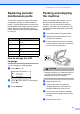
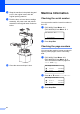
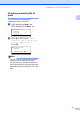


Table Of Contents
- USER’S GUIDE DCP-8060/DCP-8065DN
- Compilation and Publication Notice
- EC Declaration of Conformity
- Table of Contents
- Section I: General
- Section II: Copy
- Section III: Software
- Section IV: Appendices
- A Safety and Legal
- B Options
- C Troubleshooting and routine maintenance
- D Menu and Features
- E Specifications
- F Glossary
- Index
- brother UK/IRE/SAF

76
h Wrap the machine in the plastic bag and
put it in the original carton with the
original packing material.
i Pack the drum unit and toner cartridge
assembly, AC power cord and printed
materials in the original carton as shown
below.
j Close the carton and tape it shut.
Machine Information C
Checking the serial number C
You can see the machine’s serial number on
the LCD.
a (DCP-8060) Press Menu, 4, 1.
(DCP-8065DN) Press Menu, 5, 1.
51.Serial No.
XXXXXXXXX
b Press Stop/Exit.
Checking the page counters C
You can see the machine’s page counters for
copies, printed pages, lists or a summary
total.
a (DCP-8060) Press Menu, 4, 2.
(DCP-8065DN) Press Menu, 5, 2.
The LCD shows number of pages for
Total and Copy.
52.Page Counter
a
Total :XXXXXX
b
Copy :XXXXXX
b Press a or b to see Print or List.
52.Page Counter
a
Print :XXXXXX
b
List :XXXXXX
c Press Stop/Exit.