
User Manual
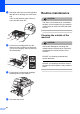




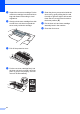
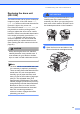
Table Of Contents
- USER’S GUIDE DCP-8060/DCP-8065DN
- Compilation and Publication Notice
- EC Declaration of Conformity
- Table of Contents
- Section I: General
- Section II: Copy
- Section III: Software
- Section IV: Appendices
- A Safety and Legal
- B Options
- C Troubleshooting and routine maintenance
- D Menu and Features
- E Specifications
- F Glossary
- Index
- brother UK/IRE/SAF

Troubleshooting and routine maintenance
67
CAUTION
To prevent damage to the machine from
static electricity, DO NOT touch the
electrodes shown in the illustration.
c Gently clean the laser scanner window
(1) by wiping it with a clean soft, dry lint-
free cloth. Do not use isopropyl alcohol.
d Put the drum unit and toner cartridge
assembly back into the machine.
e Close the front cover.
f Plug the machine’s power cord back into
the electrical socket.
Turn on the machine’s power switch.
1