
User Manual


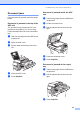
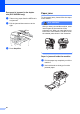
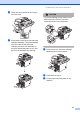
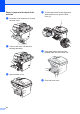

Table Of Contents
- USER’S GUIDE DCP-8060/DCP-8065DN
- Compilation and Publication Notice
- EC Declaration of Conformity
- Table of Contents
- Section I: General
- Section II: Copy
- Section III: Software
- Section IV: Appendices
- A Safety and Legal
- B Options
- C Troubleshooting and routine maintenance
- D Menu and Features
- E Specifications
- F Glossary
- Index
- brother UK/IRE/SAF

Troubleshooting and routine maintenance
59
Document jams C
If the document is jammed, follow the steps
below.
Document is jammed in the top of the
ADF unit C
The document may get jammed if it is not
inserted or fed properly, or if it is too long.
Follow the steps below to clear a document
jam.
a Take out any paper from the ADF that is
not jammed.
b Open the ADF cover.
c Pull the jammed document out to the
left.
d Close the ADF cover.
e Press Stop/Exit.
Document is jammed inside the ADF
unit C
a Take out any paper from the ADF that is
not jammed.
b Lift the document cover.
c Pull the jammed document out to the
right.
d Close the document cover.
e Press Stop/Exit.
Document is jammed at the output
tray C
a Take out any paper from the ADF that is
not jammed.
b Pull the jammed document out to the
right.
c Press Stop/Exit.