
User Manual
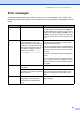

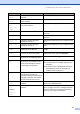


Table Of Contents
- USER’S GUIDE DCP-8060/DCP-8065DN
- Compilation and Publication Notice
- EC Declaration of Conformity
- Table of Contents
- Section I: General
- Section II: Copy
- Section III: Software
- Section IV: Appendices
- A Safety and Legal
- B Options
- C Troubleshooting and routine maintenance
- D Menu and Features
- E Specifications
- F Glossary
- Index
- brother UK/IRE/SAF

58
Unable to
Scan
The machine has a mechanical
problem.
Turn off the machine's power switch and then
turn it on again. If the error message continues
leave the machine for several minutes and then
try it again.
Document is too long for duplex
scanning.
Press Stop/Exit. Use a suitable size of paper for
duplex scanning. See Scan on page 91.
Error Message Cause Action