
User Manual
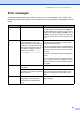

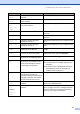

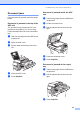
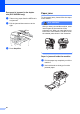
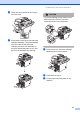
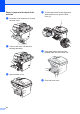

Table Of Contents
- USER’S GUIDE DCP-8060/DCP-8065DN
- Compilation and Publication Notice
- EC Declaration of Conformity
- Table of Contents
- Section I: General
- Section II: Copy
- Section III: Software
- Section IV: Appendices
- A Safety and Legal
- B Options
- C Troubleshooting and routine maintenance
- D Menu and Features
- E Specifications
- F Glossary
- Index
- brother UK/IRE/SAF

Troubleshooting and routine maintenance
57
Paper Jam
Inside
The paper is jammed inside the
machine.
See Paper jams on page 60.
Paper Jam
MPTray
The paper is jammed in the MP tray
of the machine.
See Paper jams on page 60.
Paper Jam
Tray1
Paper Jam
Tray2
The paper is jammed in the paper
tray of the machine.
See Paper jams on page 60.
Replace Fuser It is time to replace the fuser unit. Call Brother Customer Service to replace the
fuser unit.
Replace Laser It is time to replace the laser unit. Call Brother Customer Service to replace the
laser unit.
Replace PF
Kit1
It is time to replace the paper
feeding kit for Tray 1.
Call Brother Customer Service to replace the PF
Kit 1.
Replace PF
Kit2
It is time to replace the paper
feeding kit for Tray 2.
Call Brother Customer Service to replace the PF
Kit 2.
Replace PF
KitMP
It is time to replace the paper
feeding kit for the MP tray.
Call Brother Customer Service to replace the PF
Kit MP.
Scanner
Locked
The scanner glass’s sensor does
not move to the home position.
Open the document cover, then release the
scanner lock lever, and press Stop/Exit.
Toner Error The toner cartridge and drum unit
assembly is not installed properly.
Reinstall the toner cartridge.
Toner Life
End
The toner cartridge and drum unit
assembly is not installed properly,
or the toner cartridge is used up
and printing is not possible.
Do one of the following:
Re-install the toner cartridge and drum unit
assembly.
Replace the toner cartridge with a new one.
(See Replacing the toner cartridge (TN-
3130/TN-3170) on page 70.)
Toner Low If the LCD shows Toner Low, you
can still print; however, the
machine is telling you that the toner
cartridge is near the end of its life
and the toner will soon run out.
Order a new toner cartridge now.
Too Many
Trays
More than one optional tray is
installed.
The maximum number of optional trays is one.
Remove any additional trays.
Unable to
Init.
(Initialize)
Unable to
Print
The machine has a mechanical
problem.
Turn off the machine’s power switch and then
turn it on again. If the error message continues
leave the machine for several minutes before
you try to print, copy or scan again.
Error Message Cause Action