
User Manual

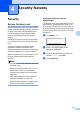
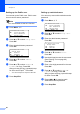
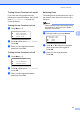


Table Of Contents
- USER’S GUIDE DCP-8060/DCP-8065DN
- Compilation and Publication Notice
- EC Declaration of Conformity
- Table of Contents
- Section I: General
- Section II: Copy
- Section III: Software
- Section IV: Appendices
- A Safety and Legal
- B Options
- C Troubleshooting and routine maintenance
- D Menu and Features
- E Specifications
- F Glossary
- Index
- brother UK/IRE/SAF

Security features
21
4
Turning Secure Function Lock on/off 4
If you enter the wrong password when
following the instructions below, the LCD will
show Wrong Password. Re-enter the
correct password.
Turning Secure Function Lock on 4
a Press Menu, 1, 7.
17.Function Lock
a Lock OffiOn
Set Password
b Setup User
Select ab & OK
b Press a or b to select Lock OffiOn.
Press OK.
c Enter your four-digit administrator
password. Press OK.
Turning Secure Function Lock off 4
a Press Menu, 1, 7.
17.Function Lock
a Lock OniOff
b Change User
Select ab & OK
b Press a or b to select Lock OniOff.
Press OK.
c Enter your four-digit administrator
password. Press OK.
Switching Users 4
This setting allows a restricted user to log on
the machine when Secure Function Lock is
turned on.
Note
After a restricted user has finished using
the machine, it will return to the Public
setting in one minute.
a Hold down d as you press Secure.
Function Lock
Change User
a John
b Mary
Select
ab & OK
b Press a or b to select the registered
name of the user to be logged on.
Press OK.
c Enter your four-digit password.
Press OK.