
User Manual

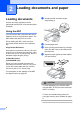
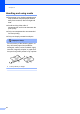


Table Of Contents
- USER’S GUIDE DCP-8060/DCP-8065DN
- Compilation and Publication Notice
- Table of Contents
- Section I: General
- Section II: Copy
- Section III: Software
- Section IV: Appendices
- A Safety and Legal
- Choosing a location
- Important Information
- Important Information
- B Options
- C Troubleshooting and routine maintenance
- D Menu and Features
- E Specifications E
- F Glossary
- A Safety and Legal
- Index
- brother ARL/ASA/NZ

Loading documents and paper
9
2
Using the scanner glass
(Flatbed) 2
You can use the scanner glass to scan, or
copy the pages of a book or single sheets of
paper. Documents can be up to 215.9 mm
wide and up to 355.6 mm long (8.5 inches
wide to 14 inches long).
To use the scanner glass, the ADF must be
empty.
a Lift the document cover.
b Using the document guidelines on the
left, center the document face down on
the scanner glass.
c Close the document cover.
CAUTION
If the document is a book or is thick, do not
slam the cover or press on it.
Acceptable paper and
other media 2
Print quality may vary according to the type of
paper you use.
You can use the following types of media:
plain paper, transparencies, labels or
envelopes.
For best results, follow the instructions below:
Use paper made for plain paper copying.
Use paper that is 75 to 90 gsm (20 to
24 lb).
Use labels or transparencies which are
designed for use in laser printers.
When using transparencies remove each
sheet immediately to prevent smudging or
paper jams.
Let printed paper cool down before
removing it from the output tray.
Use long grain paper with a neutral Ph
value, and a moisture content around 5%.
We recommend using “3M Transparency
Film” when you print on transparencies.