
User's Guide
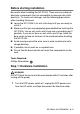
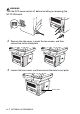
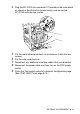
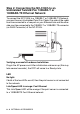
Table Of Contents
- USER'S GUIDE DCP-8040/DCP-8045D
- Brother numbers
- Ordering accessories and supplies
- Safety precautions
- Choosing a location
- Table of Contents
- 1 Introduction
- 2 Paper
- 3 On-screen programming
- 4 Getting started
- 5 Making copies
- 6 Important information
- 7 Troubleshooting and routine maintenance
- 8 Optional accessories
- Glossary
- Specifications
- Index
- brother USA/CAN

OPTIONAL ACCESSORIES 8 - 6
Before starting installation
Be careful when handling the NC-9100h. There are many delicate
electronic components that are susceptible to damage from static
electricity. To avoid such damage, use the following precautions
when handling the board.
■
Leave the NC-9100h in its anti-static bag until you are ready to
install it.
■
Make sure that you are adequately grounded before touching the
NC-9100h. Use an anti-static wrist strap and a grounding mat if
possible. If you do not have an anti-static wrist strap, touch the
bare metal surface on the back of the machine before handling
the NC-9100h.
■
Avoid moving around the work area in order to eliminate static
charge build-up.
■
If possible, do not work on a carpeted area.
■
Do not flex the board and do not touch the components on the
card.
Tools Required:
Phillips Screwdriver
Step 1: Hardware installation
WARNI NG
DO NOT touch the surface of the main boards within 15 minutes after
turning off the power.
1
Turn the DCP power switch off, unplug the DCP power cord
from the AC outlet, and then disconnect the interface cable.