
User's Guide
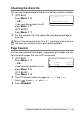
Table Of Contents
- USER'S GUIDE DCP-8040/DCP-8045D
- Brother numbers
- Ordering accessories and supplies
- Safety precautions
- Choosing a location
- Table of Contents
- 1 Introduction
- 2 Paper
- 3 On-screen programming
- 4 Getting started
- 5 Making copies
- 6 Important information
- 7 Troubleshooting and routine maintenance
- 8 Optional accessories
- Glossary
- Specifications
- Index
- brother USA/CAN

TROUBLESHOOTING AND ROUTINE MAINTENANCE 7 - 34
Checking the drum life
You can see the percentage of the drum’s life that remains available.
1
(DCP-8040)
Press
Menu
,
1
,
6
.
—OR—
If you have the optional tray #2,
press
Menu
,
1
,
7
.
(DCP-8045D)
Press
Menu
,
1
,
7
.
2
For five seconds, the LCD shows the available percentage of
drum life.
Page Counter
You can see number of total pages, copy pages, print pages and List
(total list print) pages that your DCP has printed.
1
(DCP-8040)
Press
Menu
,
1
,
7
.
—OR—
If you have the optional tray #2,
press
Menu
,
1
,
8
.
(DCP-8045D)
Press
Menu
,
1
,
8
.
2
The LCD shows number of pages for
Total
and
Copy
.
Press to see
Print
and
List
.
3
Press
Stop/Exit
.
Even if the remaining drum life is 0%, you may continue to use
the drum unit until you have a print quality problem.
17.Drum Life
Remaining:100%
18.Page Counter
▲
Total :123456
▼
Copy :120002