
User's Guide
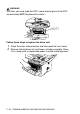
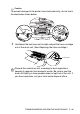
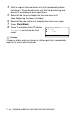
Table Of Contents
- USER'S GUIDE DCP-8040/DCP-8045D
- Brother numbers
- Ordering accessories and supplies
- Safety precautions
- Choosing a location
- Table of Contents
- 1 Introduction
- 2 Paper
- 3 On-screen programming
- 4 Getting started
- 5 Making copies
- 6 Important information
- 7 Troubleshooting and routine maintenance
- 8 Optional accessories
- Glossary
- Specifications
- Index
- brother USA/CAN

7 - 33 TROUBLESHOOTING AND ROUTINE MAINTENANCE
4
Wait to unpack the new drum unit until immediately before
installing it. Place the old drum unit into the plastic bag and
discard it according to local regulations.
5
Reinstall the toner cartridge into the new drum unit.
(See
Replacing the toner cartridge
.)
6
Reinstall the new drum unit, keeping the front cover open.
7
Press
Clear/Back
.
8
Press
1
and when the LCD shows
Accepted
, and close the front
cover.
Caution
If toner scatters and your hands or clothes get dirty, immediately
wipe off or wash with cold water.
Replace Drum?
▲
1.Yes
▼
2.No
Select
▲▼
& Set