
User's Guide
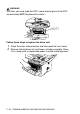
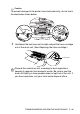
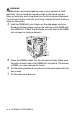
Table Of Contents
- USER'S GUIDE DCP-8040/DCP-8045D
- Brother numbers
- Ordering accessories and supplies
- Safety precautions
- Choosing a location
- Table of Contents
- 1 Introduction
- 2 Paper
- 3 On-screen programming
- 4 Getting started
- 5 Making copies
- 6 Important information
- 7 Troubleshooting and routine maintenance
- 8 Optional accessories
- Glossary
- Specifications
- Index
- brother USA/CAN

TROUBLESHOOTING AND ROUTINE MAINTENANCE 7 - 32
Caution
To prevent damage to the printer from static electricity, do not touch
the electrodes shown below.
3
Hold down the lock lever on the right and pull the toner cartridge
out of the drum unit. (See
Replacing the toner cartridge
.)
Discard the used drum unit according to local regulations,
keeping it separate from domestic waste. Be sure to seal the
drum unit tightly so toner powder does not spill out of the unit. If
you have questions, call your local waste disposal office.
Lock Lever