
User's Guide
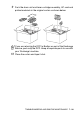
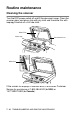
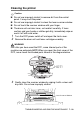
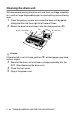
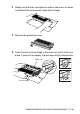
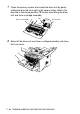
Table Of Contents
- USER'S GUIDE DCP-8040/DCP-8045D
- Brother numbers
- Ordering accessories and supplies
- Safety precautions
- Choosing a location
- Table of Contents
- 1 Introduction
- 2 Paper
- 3 On-screen programming
- 4 Getting started
- 5 Making copies
- 6 Important information
- 7 Troubleshooting and routine maintenance
- 8 Optional accessories
- Glossary
- Specifications
- Index
- brother USA/CAN

7 - 23 TROUBLESHOOTING AND ROUTINE MAINTENANCE
Cleaning the drum unit
We recommend placing the drum unit and toner cartridge assembly
on a cloth or large disposable paper to avoid spilling and scattering
toner.
1
Clean the primary corona wire inside the drum unit by gently
sliding the blue tab from right to left several times.
2
Return the blue tab and snap it into the Home position (
▼
).
Caution
If the blue tab is not at Home position (
▼
), printed pages may have
vertical stripes.
3
Reinstall the drum unit and toner cartridge assembly into the
DCP. (See Replacing the drum unit.)
4
Close the front cover.
5
Plug in the power cord.
Corona Wire
Tab
Home Position(▼)