
User Manual
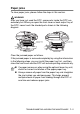
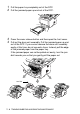
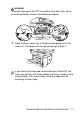
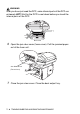
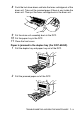
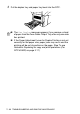
Table Of Contents
- USER'S GUIDE DCP-8040/DCP-8045D
- "EC" Declaration of Conformity
- Safety precautions
- Choosing a location
- Table of Contents
- 1 Introduction
- 2 Paper
- 3 On-screen programming
- 4 Getting started
- 5 Making copies
- 6 Important information
- 7 Troubleshooting and routine maintenance
- 8 Optional accessories
- Glossary
- Specifications
- Index
- brother UK/IRE/SAF/PAN NORDIC

TROUBLESHOOTING AND ROUTINE MAINTENANCE 7 - 7
WARNI NG
To prevent damage to the DCP caused by static electricity, do not
touch the electrodes shown in the following diagram.
5
Open the back output tray. Pull the jammed paper out of the
fuser unit. If the paper jam can be cleared, go to Step 7.
If you have to pull the paper toward the back of the DCP, the
fuser may get dirty with toner powder and it may scatter on the
next printouts. Print a few copies of the test page until the
scattering of toner stops.