
User Manual
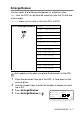

Table Of Contents
- USER'S GUIDE DCP-8040/DCP-8045D
- "EC" Declaration of Conformity
- Safety precautions
- Choosing a location
- Table of Contents
- 1 Introduction
- 2 Paper
- 3 On-screen programming
- 4 Getting started
- 5 Making copies
- 6 Important information
- 7 Troubleshooting and routine maintenance
- 8 Optional accessories
- Glossary
- Specifications
- Index
- brother UK/IRE/SAF/PAN NORDIC

5 - 8 MAKING COPIES
5
Press or to select the enlargement or reduction ratio
you want.
Press
Set
.
—OR—
You can select
Custom
(25-400%)
and press
Set
.
Use the dial pad to enter an enlargement or reduction ratio from
25%
to
400%
.
Press
Set
.
(For example, press
5 3
to enter
53%
.)
6
Press
Start
.
—OR—
Press other temporary copy keys for more settings.
■
Special Copy Options (2in1, 4in1 or Poster) are not available
with
Enlarge/Reduce
.
■ Auto
is not available with the scanner glass.