
User Manual
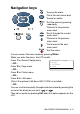
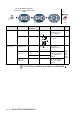
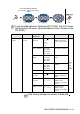
Table Of Contents
- USER'S GUIDE DCP-8040/DCP-8045D
- "EC" Declaration of Conformity
- Safety precautions
- Choosing a location
- Table of Contents
- 1 Introduction
- 2 Paper
- 3 On-screen programming
- 4 Getting started
- 5 Making copies
- 6 Important information
- 7 Troubleshooting and routine maintenance
- 8 Optional accessories
- Glossary
- Specifications
- Index
- brother UK/IRE/SAF/PAN NORDIC

3 - 3 ON-SCREEN PROGRAMMING
The LCD will then show the next menu level.
Press or to scroll to your next menu selection.
Press
Set
.
When you finish setting an option, the LCD shows
Accepted
.
Use to scroll backward if you passed your choices or want
to save keystrokes.
The current setting is always the option with “ ”.