
User Manual
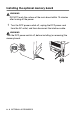
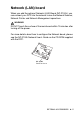
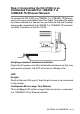
Table Of Contents
- USER'S GUIDE DCP-8040/DCP-8045D
- "EC" Declaration of Conformity
- Safety precautions
- Choosing a location
- Table of Contents
- 1 Introduction
- 2 Paper
- 3 On-screen programming
- 4 Getting started
- 5 Making copies
- 6 Important information
- 7 Troubleshooting and routine maintenance
- 8 Optional accessories
- Glossary
- Specifications
- Index
- brother UK/IRE/SAF/PAN NORDIC

OPTIONAL ACCESSORIES 8 - 5
Network (LAN) board
When you add the optional Network (LAN) Board (NC-9100h), you
can connect your DCP into the network to use the Network Scanner,
Network Printer and Network Management operations.
WARNI NG
DO NOT touch the surface of the main board within 15 minutes after
turning off the power.
For more details about how to configure the Network board, please
see the NC-9100h Network User's Guide on the CD-ROM supplied
with the DCP.
NC-9100h
Print/Fax Server