
Owner's Manual

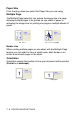
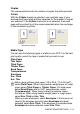
Table Of Contents
- Top Page
- Network User’s Guide
- USER'S GUIDE DCP-8040 DCP-8045D
- Brother numbers
- Ordering accessories and supplies
- Safety precautions
- Choosing a location
- Table of Contents
- 1 Introduction
- 2 Paper
- 3 On-screen programming
- 4 Getting started
- 5 Making copies
- 6 Using the DCP as a printer
- 7 Printer driver settings
- 8 How to scan using Windows®
- Scanning a document
- Scanning a document (For Windows® XP only)
- Using the scan key (For USB or Parallel interface cable users)
- Using ScanSoft® PaperPort® and OmniPage® OCR
- 9 Using the Brother Control Center (For Windows® 98/98SE/Me/2000 Professional and Windows NT® WS 4.0)
- 10 Using the Windows®-Based Brother SmartUI Control Center (For Windows® XP)
- 11 Using your DCP with a Macintosh®
- Setting up your USB-equipped Apple® Macintosh®
- Using the Brother printer driver with your Apple® Macintosh® (Mac OS® 8.6 - 9.2)
- Using the Brother Printer Driver with Your Apple® Macintosh® (Mac OS® X)
- Using the PS driver with your Apple® Macintosh®
- Using the Brother TWAIN scanner driver with your Macintosh®
- Using Presto!® PageManager®
- 12 Network Scanning (Windows® 98/98SE/Me/2000 Professional and XP only)
- 13 Important information
- 14 Troubleshooting and routine maintenance
- 15 Optional accessories
- Glossary
- Specifications
- Index
- brother USA
PRINTER DRIVER SETTINGS 7 - 4
Copies
The copies selection sets the number of copies that will be printed.
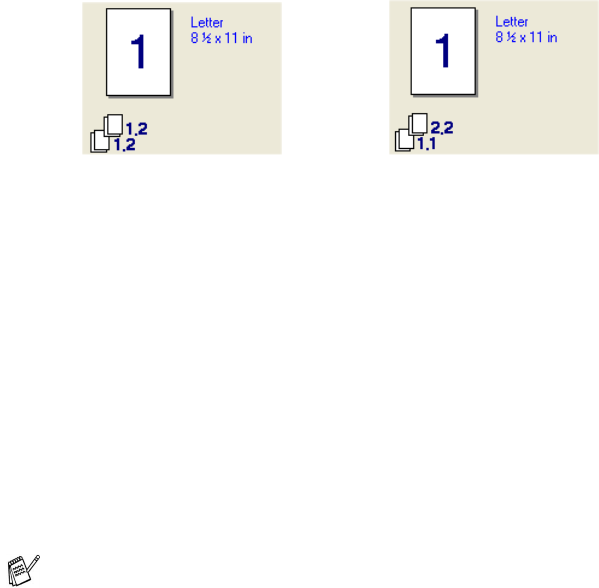
Collate
With the Collate check box selected, one complete copy of your
document will be printed and then repeated for the number of copies
you selected. If the Collate check box is not selected, then each
page will be printed for all the copies selected before the next page
of the document is printed.
Media Type
You can use the following types of media in your DCP. For the best
print quality, select the type of media that you wish to use.
Plain Paper
Thin Paper
Thick Paper
Thicker Paper
Bond Paper
Transparencies
Envelopes
Env. Thick
Env. Thin
When using ordinary plain paper (19 to 25 lb / 70 to 90 g/m
2
),
select Plain Paper. When using heavier weight paper or rough
paper select Thick Paper or Thicker Paper. For bond paper,
select Bond Paper and for OHP transparencies, select
Transparencies. When using ordinary envelopes, select
Envelopes. When using heavier weight paper or rough paper
select Env. Thick or Env. Thin.
When you use envelopes, select Envelopes. If the toner is not
fixed to the envelope correctly when Envelopes has been
selected, select Env. Thick. If the envelope is crumpled when
Envelopes has been selected, select Env. Thin.
Collate box checked Collate box not checked