
Owner's Manual
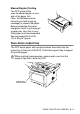
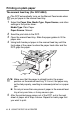
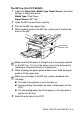
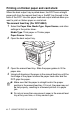
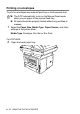

Table Of Contents
- Top Page
- Network User’s Guide
- USER'S GUIDE DCP-8040 DCP-8045D
- Brother numbers
- Ordering accessories and supplies
- Safety precautions
- Choosing a location
- Table of Contents
- 1 Introduction
- 2 Paper
- 3 On-screen programming
- 4 Getting started
- 5 Making copies
- 6 Using the DCP as a printer
- 7 Printer driver settings
- 8 How to scan using Windows®
- Scanning a document
- Scanning a document (For Windows® XP only)
- Using the scan key (For USB or Parallel interface cable users)
- Using ScanSoft® PaperPort® and OmniPage® OCR
- 9 Using the Brother Control Center (For Windows® 98/98SE/Me/2000 Professional and Windows NT® WS 4.0)
- 10 Using the Windows®-Based Brother SmartUI Control Center (For Windows® XP)
- 11 Using your DCP with a Macintosh®
- Setting up your USB-equipped Apple® Macintosh®
- Using the Brother printer driver with your Apple® Macintosh® (Mac OS® 8.6 - 9.2)
- Using the Brother Printer Driver with Your Apple® Macintosh® (Mac OS® X)
- Using the PS driver with your Apple® Macintosh®
- Using the Brother TWAIN scanner driver with your Macintosh®
- Using Presto!® PageManager®
- 12 Network Scanning (Windows® 98/98SE/Me/2000 Professional and XP only)
- 13 Important information
- 14 Troubleshooting and routine maintenance
- 15 Optional accessories
- Glossary
- Specifications
- Index
- brother USA

USING THE DCP AS A PRINTER 6 - 4
Manual Duplex Printing
The DCP prints all the
even-numbered pages on one
side of the paper first.
Then, the Windows
®
driver
instructs you (with a pop-up
message) to reinsert the paper.
Before reinserting the paper,
straighten it well, or you may get
a paper jam. Very thin or very
thick paper is not recommended.
We recommend 20 to 24 lb
(75 to 90 g/m
2
) paper.
Face-down output tray
The DCP ejects paper with printed surfaces face down into the
output tray in the front of the DCP. Unfold the support flap to support
the printed pages.
When printing transparencies, remove each one from the
support flap after it exits the DCP.
Support Flap
with Extension