
Owner's Manual
Table Of Contents
- Top Page
- Network User’s Guide
- USER'S GUIDE DCP-8040 DCP-8045D
- Brother numbers
- Ordering accessories and supplies
- Safety precautions
- Choosing a location
- Table of Contents
- 1 Introduction
- 2 Paper
- 3 On-screen programming
- 4 Getting started
- 5 Making copies
- 6 Using the DCP as a printer
- 7 Printer driver settings
- 8 How to scan using Windows®
- Scanning a document
- Scanning a document (For Windows® XP only)
- Using the scan key (For USB or Parallel interface cable users)
- Using ScanSoft® PaperPort® and OmniPage® OCR
- 9 Using the Brother Control Center (For Windows® 98/98SE/Me/2000 Professional and Windows NT® WS 4.0)
- 10 Using the Windows®-Based Brother SmartUI Control Center (For Windows® XP)
- 11 Using your DCP with a Macintosh®
- Setting up your USB-equipped Apple® Macintosh®
- Using the Brother printer driver with your Apple® Macintosh® (Mac OS® 8.6 - 9.2)
- Using the Brother Printer Driver with Your Apple® Macintosh® (Mac OS® X)
- Using the PS driver with your Apple® Macintosh®
- Using the Brother TWAIN scanner driver with your Macintosh®
- Using Presto!® PageManager®
- 12 Network Scanning (Windows® 98/98SE/Me/2000 Professional and XP only)
- 13 Important information
- 14 Troubleshooting and routine maintenance
- 15 Optional accessories
- Glossary
- Specifications
- Index
- brother USA
ON-SCREEN PROGRAMMING 3 - 8
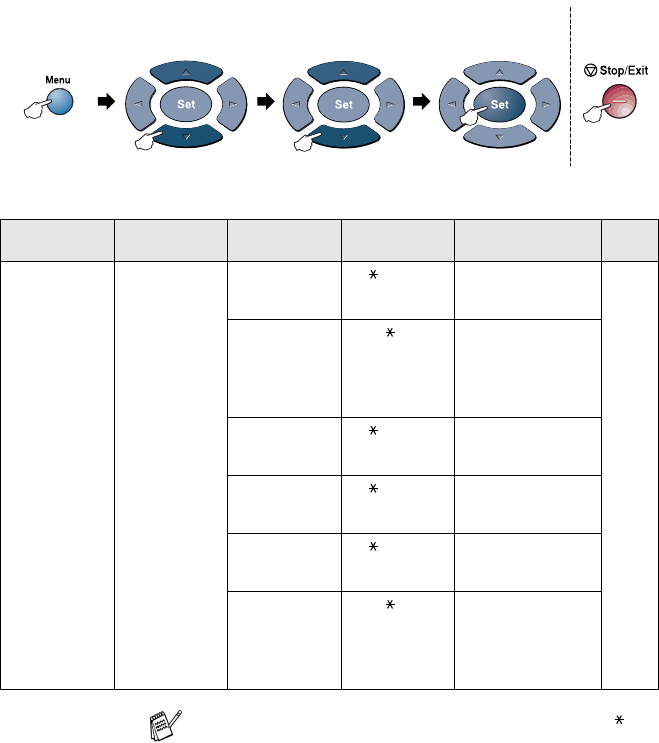
(See the Network User’s Guide on the CD-ROM.)
Main Menu Submenu Menu
Selections
Options Descriptions Page
4.LAN
(option)
(Continued)
2
.
Setup Misc.
1.Netware On
Off
Select On to use the
DCP on a Netware
network.
See
Network
User’s
Guide
on the
CD-ROM.
2.Net Frame Auto
8023
ENET
8022
SNAP
Lets you specify the
frame type.
3.AppleTalk On
Off
Select On to use the
DCP on a Macintosh
network.
4.DLC/LLC On
Off
Select On to use the
DCP on a DLC/LLC
network.
5.Net
BIOS/IP
On
Off
Select On to use the
DCP on a Net
BIOS/IP network.
6.Ethernet Auto
100B-FD
100B-HD
10B-FD
10B-HD
Selects Ethernet link
mode.
The default settings are shown in Bold with .
to accept
to
exit
Press the Menu numbers.
(ex. Press 1, 1 for Paper Type)
—
OR
—
to select to select