
Owner's Manual
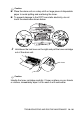

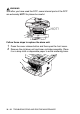
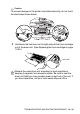

Table Of Contents
- Top Page
- Network User’s Guide
- USER'S GUIDE DCP-8040 DCP-8045D
- Brother numbers
- Ordering accessories and supplies
- Safety precautions
- Choosing a location
- Table of Contents
- 1 Introduction
- 2 Paper
- 3 On-screen programming
- 4 Getting started
- 5 Making copies
- 6 Using the DCP as a printer
- 7 Printer driver settings
- 8 How to scan using Windows®
- Scanning a document
- Scanning a document (For Windows® XP only)
- Using the scan key (For USB or Parallel interface cable users)
- Using ScanSoft® PaperPort® and OmniPage® OCR
- 9 Using the Brother Control Center (For Windows® 98/98SE/Me/2000 Professional and Windows NT® WS 4.0)
- 10 Using the Windows®-Based Brother SmartUI Control Center (For Windows® XP)
- 11 Using your DCP with a Macintosh®
- Setting up your USB-equipped Apple® Macintosh®
- Using the Brother printer driver with your Apple® Macintosh® (Mac OS® 8.6 - 9.2)
- Using the Brother Printer Driver with Your Apple® Macintosh® (Mac OS® X)
- Using the PS driver with your Apple® Macintosh®
- Using the Brother TWAIN scanner driver with your Macintosh®
- Using Presto!® PageManager®
- 12 Network Scanning (Windows® 98/98SE/Me/2000 Professional and XP only)
- 13 Important information
- 14 Troubleshooting and routine maintenance
- 15 Optional accessories
- Glossary
- Specifications
- Index
- brother USA

14 - 27 TROUBLESHOOTING AND ROUTINE MAINTENANCE
3
Unpack the new toner cartridge. Place the used toner cartridge
into the aluminum bag and discard it according to local
regulations.
Caution
■
Wait to unpack the toner cartridge until immediately before you
install it in the DCP. If a toner cartridge is left unpacked for a long
period of time, the toner life is shortened.
■
Brother strongly recommends that you do not refill the toner
cartridge provided with your DCP. We also strongly recommend
that you continue to use only Genuine Brother Brand
replacement toner cartridges. (TN-540 and TN-570).
Using or attempting to use potentially incompatible toner and/or
toner cartridges in your DCP may cause damage to the machine
itself and/or it may result in unsatisfactory print quality. Our
warranty coverage does not apply to any problem that was
caused by the use of unauthorized third party toner and toner
cartridges. To protect your investment and guarantee your print
quality please continue to replace consumed toner cartridges
with only Genuine Brother Branded Supplies.