
Owner's Manual
Table Of Contents
- Top Page
- Network User’s Guide
- USER'S GUIDE DCP-8040 DCP-8045D
- Brother numbers
- Ordering accessories and supplies
- Safety precautions
- Choosing a location
- Table of Contents
- 1 Introduction
- 2 Paper
- 3 On-screen programming
- 4 Getting started
- 5 Making copies
- 6 Using the DCP as a printer
- 7 Printer driver settings
- 8 How to scan using Windows®
- Scanning a document
- Scanning a document (For Windows® XP only)
- Using the scan key (For USB or Parallel interface cable users)
- Using ScanSoft® PaperPort® and OmniPage® OCR
- 9 Using the Brother Control Center (For Windows® 98/98SE/Me/2000 Professional and Windows NT® WS 4.0)
- 10 Using the Windows®-Based Brother SmartUI Control Center (For Windows® XP)
- 11 Using your DCP with a Macintosh®
- Setting up your USB-equipped Apple® Macintosh®
- Using the Brother printer driver with your Apple® Macintosh® (Mac OS® 8.6 - 9.2)
- Using the Brother Printer Driver with Your Apple® Macintosh® (Mac OS® X)
- Using the PS driver with your Apple® Macintosh®
- Using the Brother TWAIN scanner driver with your Macintosh®
- Using Presto!® PageManager®
- 12 Network Scanning (Windows® 98/98SE/Me/2000 Professional and XP only)
- 13 Important information
- 14 Troubleshooting and routine maintenance
- 15 Optional accessories
- Glossary
- Specifications
- Index
- brother USA
TROUBLESHOOTING AND ROUTINE MAINTENANCE 14 - 4
Original jams
Based upon where the original is jammed, follow the appropriate set
of instructions to remove it.
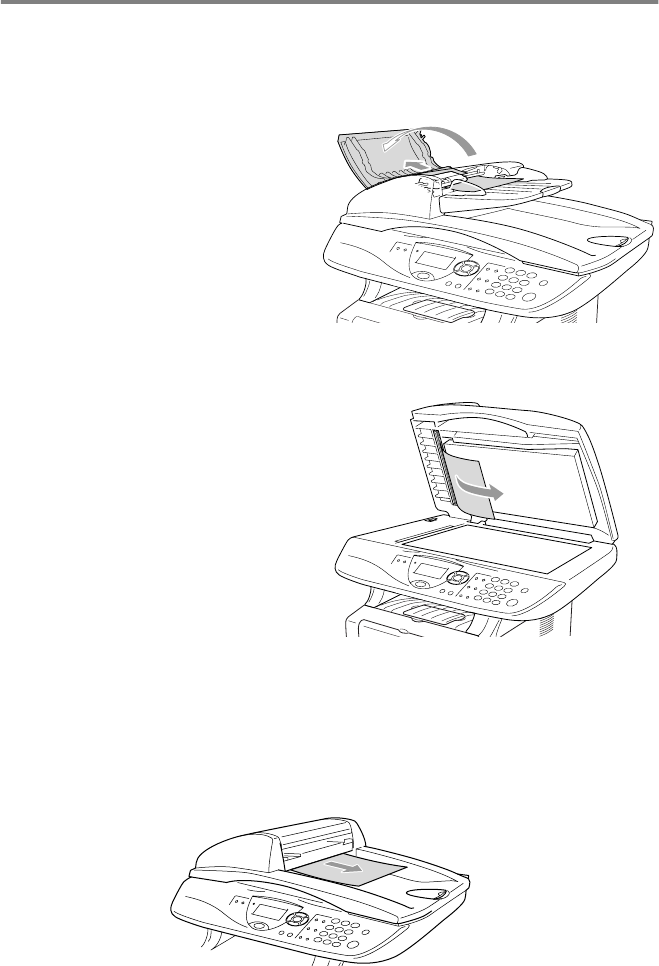
Original is jammed in the top of the ADF unit.
1
Take out any paper from
the ADF that is not
jammed.
2
Lift the ADF cover.
3
Pull the jammed original
out to the right.
4
Close the ADF cover.
5
Press
Stop/Exit
.
Original is jammed inside the ADF unit.
1
Take out any paper from
the ADF that is not
jammed.
2
Lift the document cover.
3
Pull the jammed original
out to the right.
4
Close the document
cover.
5
Press
Stop/Exit
.
—OR—
1
Take the ADF support out of the ADF unit.
2
Pull the jammed original out to the right.
3
Press
Stop/Exit
.