
Owner's Manual
Table Of Contents
- Top Page
- Network User’s Guide
- USER'S GUIDE DCP-8040 DCP-8045D
- Brother numbers
- Ordering accessories and supplies
- Safety precautions
- Choosing a location
- Table of Contents
- 1 Introduction
- 2 Paper
- 3 On-screen programming
- 4 Getting started
- 5 Making copies
- 6 Using the DCP as a printer
- 7 Printer driver settings
- 8 How to scan using Windows®
- Scanning a document
- Scanning a document (For Windows® XP only)
- Using the scan key (For USB or Parallel interface cable users)
- Using ScanSoft® PaperPort® and OmniPage® OCR
- 9 Using the Brother Control Center (For Windows® 98/98SE/Me/2000 Professional and Windows NT® WS 4.0)
- 10 Using the Windows®-Based Brother SmartUI Control Center (For Windows® XP)
- 11 Using your DCP with a Macintosh®
- Setting up your USB-equipped Apple® Macintosh®
- Using the Brother printer driver with your Apple® Macintosh® (Mac OS® 8.6 - 9.2)
- Using the Brother Printer Driver with Your Apple® Macintosh® (Mac OS® X)
- Using the PS driver with your Apple® Macintosh®
- Using the Brother TWAIN scanner driver with your Macintosh®
- Using Presto!® PageManager®
- 12 Network Scanning (Windows® 98/98SE/Me/2000 Professional and XP only)
- 13 Important information
- 14 Troubleshooting and routine maintenance
- 15 Optional accessories
- Glossary
- Specifications
- Index
- brother USA
x
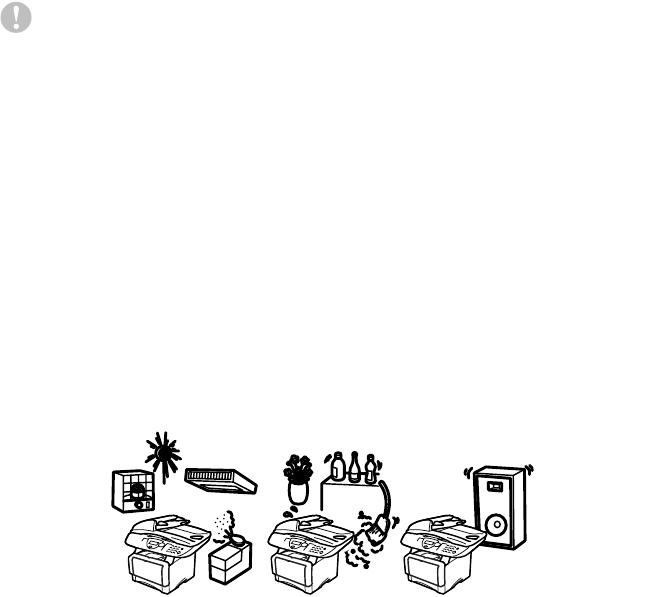
Choosing a location
Place your DCP on a flat, stable surface that is free of vibration and
shocks, such as a desk. Put the DCP near a telephone jack and a
standard, grounded power outlet. Choose a location where the
temperature remains between 50°F and 95.5°F (10°-32.5°C).
Caution
■
Do not place near heaters, air conditioners, water, chemicals, or
refrigerators.
■
Do not expose the DCP to direct sunlight, excessive heat,
moisture, or dust.
■
Do not connect your DCP to electrical outlets controlled by wall
switches or automatic timers.
■
Disruption of power can wipe out information in the DCP’s
memory.
■
Do not connect your DCP to electrical outlets on the same circuit
as large appliances or other Equipment that might disrupt the
power supply.
■
Avoid interference sources, such as speakers or the base units
of cordless phones.
NO !
NO ! NO !