
User Guide

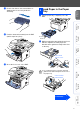


Table Of Contents
- Quick Setup Guide DCP-8040/DCP-8045D
- Getting Started
- Table of Contents
- Step1 Setting Up the Machine
- Step2 Installing the Driver & Software
- Supplied CD-ROM “MFL-Pro Suite”
- For USB Interface Cable Users (For Windows® 98/98SE/Me/2000 Professional/XP)
- For Parallel Interface Cable Users (For Windows® 98/98SE/Me/2000 Professional/XP)
- For Windows NT® Workstation Version 4.0 Users
- For Network Interface Cable Users (For Windows® 98/98SE/Me/NT/2000 Professional/XP)
- For USB Interface Cable Users
- For Network Interface Cable Users
- For Administrators
- brother UK

2
Setting Up the Machine
Do NOT connect the interface cable.
Connecting the interface cable is
done when installing the driver.
1
Open the ADF cover.
2
Insert the tabs of ADF support into the holes
of the ADF one side at a time.
3
Push ADF Support down until it latches in
place.
4
Close the ADF cover.
1
Open the front cover by pressing the front
cover release button.
2
Unpack the drum unit assembly.
Remove the protective part.
1
Install the Automatic
Document Feed (ADF)
Support
ADF Cover
Hole
Tab
ADF support
Tab
2
Install the Drum Unit
Assembly
Front Cover
Release Button
Front Cover
Drum Unit
Assembly
Protective part
Step 1