
User Guide
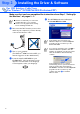
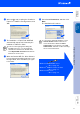
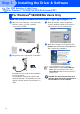

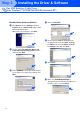


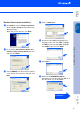
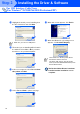

Table Of Contents
- Quick Setup Guide DCP-8040/DCP-8045D
- Getting Started
- Table of Contents
- Step1 Setting Up the Machine
- Step2 Installing the Driver & Software
- Supplied CD-ROM “MFL-Pro Suite”
- For USB Interface Cable Users (For Windows® 98/98SE/Me/2000 Professional/XP)
- For Parallel Interface Cable Users (For Windows® 98/98SE/Me/2000 Professional/XP)
- For Windows NT® Workstation Version 4.0 Users
- For Network Interface Cable Users (For Windows® 98/98SE/Me/NT/2000 Professional/XP)
- For USB Interface Cable Users
- For Network Interface Cable Users
- For Administrators
- brother UK

17
Make sure that you have completed the instructions from Step 1 “Setting Up
the Machine” on pages 2 - 5.
1
Switch off and unplug the DCP from the AC
outlet and disconnect it from your computer,
if you have already connected an interface
cable.
2
Turn on your computer.
(For Windows
®
2000 Professional/XP, you
must be logged on as the administrator.)
3
Insert the supplied CD-ROM for Windows
®
into your CD-ROM drive. If the model name
screen appears select the DCP. If the
language screen appears, select your
language.
4
The CD-ROM main menu will appear.
Click Install MFL-Pro Suite.
For Parallel Interface Cable Users
(For Windows
®
98/98SE/Me/2000 Professional/XP)
■ Brother recommends you connect the
machine directly to your computer.
■ Please close any applications running
before installing the MFL-Pro.
If this window does not appear, use
Windows
®
Explorer to run the setup.exe
program from the root directory of the
Brother CD-ROM.
If you see the following screen, click OK to
install the Windows
®
updates. After the
updates are installed your PC may restart.
Note: If it does the installation will
automatically continue.
If the installation does not continue
automatically, please open the installer
menu again by double-clicking the
setup.exe program from the root directory of
the Brother CD-ROM, and continue from
Step
4
.
Continued ...
Installing the Driver & Software
Setting Up
the Machine
Windows
®
USB
For
Administrators
Windows
®
Parallel