
User Manual


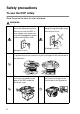

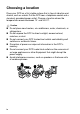



Table Of Contents
- USER'S GUIDE DCP-8040/DCP-8045D
- "EC" Declaration of Conformity
- Safety precautions
- Choosing a location
- Table of Contents
- 1 Introduction
- 2 Paper
- 3 On-screen programming
- 4 Getting started
- 5 Making copies
- 6 Important information
- 7 Troubleshooting and routine maintenance
- 8 Optional accessories
- Glossary
- Specifications
- Index
- brother UK/IRE/SAF/PAN NORDIC

iii
■
When you move the DCP, grasp the side handholds that are
under the scanner. Do NOT carry the DCP by holding it at the
bottom.
■
Install equipment with a power cord near a socket/outlet that is
easily accessible.
■
Do not use this product near appliances that use water, in a wet
basement or near a swimming pool.
Caution
■
Lightning and power surges can damage this product! There may
be a remote risk of electric shock from lightning. We recommend
that you use a quality surge protection device on the AC power
line, or unplug the line during a lightning storm.
To prevent injuries, be careful not to put
your fingers in the area shown in the
illustration.