
User Manual


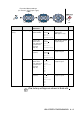
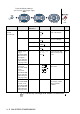


Table Of Contents
- USER'S GUIDE DCP-8040/DCP-8045D
- "EC" Declaration of Conformity
- Safety precautions
- Choosing a location
- Table of Contents
- 1 Introduction
- 2 Paper
- 3 On-screen programming
- 4 Getting started
- 5 Making copies
- 6 Important information
- 7 Troubleshooting and routine maintenance
- 8 Optional accessories
- Glossary
- Specifications
- Index
- brother UK/IRE/SAF/PAN NORDIC

3 - 7 ON-SCREEN PROGRAMMING
Main Menu Submenu Menu
Selections
Options Descriptions Page
2.Copy 1.Quality Text
Photo
Auto
Selects the Copy
resolution for your
type of original.
5-9
2.Contrast —- +
- +
- +
- +
- +
Adjusts the contrast
for copies.
5-10
3.Printer 1.Emulation — Auto
HP LaserJet
BR-Script 3
Selects the
Emulation mode.
See
Software
User’s
Guide
on the
CD-ROM
2.Print
Options
1.Internal
Font
— Prints a list of the
DCP’s internal fonts
or current printer
settings.
2
.
Configuration
—
3.Reset
Printer
— — Returns the DCP to
the factory default
settings.
The factory settings are shown in Bold with .
to accept
to
exit
Press the Menu numbers.
(ex. Press 1, 1 for Paper Type)
—
OR
—
to select to select