
User Manual


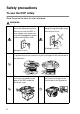

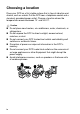



Table Of Contents
- USER'S GUIDE DCP-8040/DCP-8045D
- "EC" Declaration of Conformity
- Safety precautions
- Choosing a location
- Table of Contents
- 1 Introduction
- 2 Paper
- 3 On-screen programming
- 4 Getting started
- 5 Making copies
- 6 Important information
- 7 Troubleshooting and routine maintenance
- 8 Optional accessories
- Glossary
- Specifications
- Index
- brother UK/IRE/SAF/PAN NORDIC

ii
Safety precautions
To use the DCP safely
Save these instructions for later reference.
WARNI NG
There are high voltage
electrodes inside the machine.
Before you clean the DCP or
clear a paper jam, make sure
you have unplugged the power
cord from the power outlet.
(Example for U.K.)
Do not handle the plug with wet
hands. Doing this might cause
an electrical shock.
(Example for U.K.)
After you use the DCP, some internal parts are extremely HOT!
To prevent injuries, be careful not to put your fingers in the area shown in
the illustration.
To prevent injuries, be careful
not to put your hands on the
edge of the DCP under the
document cover.
To prevent injuries, be careful
not to put your fingers in the
area shown in the illustration.